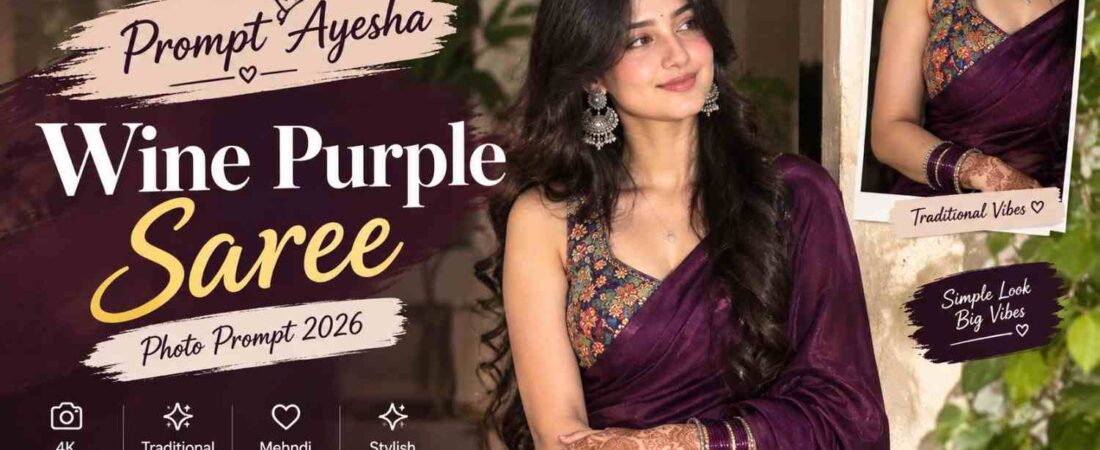
Looking for a traditional yet modern portrait idea for your next AI-generated image? This Gemini prompt is designed to create a photorealistic 4K portrait featuring a beautiful woman dressed in a rich wine-purple saree with detailed traditional styling.
The combination of the deep purple saree, colorful printed blouse, silver jewelry, glossy black hair and mehndi creates a graceful Indian fashion aesthetic. The vertical 9:16 composition also makes the concept suitable for mobile wallpapers, Instagram Stories, Reels covers and profile content.
In this comprehensive guide, we will explore the exact prompt, break down why each element contributes to the overall aesthetic, and share expert tips for achieving the most realistic and visually striking results possible.
Understanding the Wine-Purple Saree Portrait Concept
The main focus of this portrait is the saree and its detailed styling. The rich deep wine-purple color gives the outfit an elegant and luxurious appearance, while the colorful multicolored printed sleeveless blouse adds contrast to the overall look.
Wine-purple is a particularly sophisticated color choice for traditional Indian fashion portraits. It sits somewhere between deep maroon and royal purple, offering warmth without being overly bright. In photography, this color photographs beautifully—it retains depth in shadows while catching light in the folds of the fabric.
The saree should have an elegant drape that falls naturally around the body. Rather than making the pose look overly staged, the woman should maintain a graceful posture with her hands crossed naturally in front. This pose is both traditional and relaxed, suggesting confidence without formality.
Her gentle smile adds warmth to the portrait and keeps the final result approachable. A subtle smile is far more flattering in portraits than a broad grin or a serious expression—it creates a sense of connection between the subject and the viewer.
Why This Color Palette Works
The contrast between the deep wine-purple saree and the multicolored printed blouse is what makes this concept visually striking. The blouse acts as a counterpoint to the saree—while the saree provides depth and elegance, the blouse adds energy and visual interest.
This approach to color pairing is common in contemporary Indian fashion, where traditional garments are styled with modern, colorful pieces to create a look that feels both rooted in culture and relevant to current trends.
Traditional Jewelry and Mehndi Details
Accessories play an important role in completing the traditional appearance. The look includes statement silver earrings, a delicate necklace and bangles.
Silver jewelry is a particularly good choice for this portrait because it contrasts beautifully with the warm wine-purple tones of the saree. Gold jewelry would blend too much with the rich colors of the outfit, while silver creates a cool contrast that draws the eye.
Detailed mehndi on both hands adds another layer of traditional styling. Since the hands are positioned in front of the body, the mehndi should remain visible without becoming overly dominant in the composition. This is a delicate balance—mehndi should be noticeable but not the focal point.
Long, glossy black wavy hair completes the overall appearance and provides a natural contrast against the rich saree color. The waves add texture and movement, preventing the portrait from looking too stiff or formal.
The Role of Mehndi in Traditional Portraits
Mehndi is more than just decoration—it is a cultural symbol with deep roots in Indian tradition. In portrait photography, visible mehndi communicates that the subject is dressed for a special occasion, whether a wedding, a festival, or a family celebration.
By including detailed mehndi in the prompt, you add a layer of cultural authenticity that makes the portrait feel genuine rather than generic.
The Exact AI Image Prompt
Use the following prompt exactly as provided. Copy it without modification for the best results.
Create a photorealistic 4K portrait of a beautiful young woman wearing a rich deep wine-purple saree with an elegant drape and a colorful multicolored printed sleeveless blouse featuring intricate traditional patterns. Long glossy black wavy hair, statement silver earrings, delicate necklace, bangles, and detailed mehndi on both hands. Soft natural makeup, gentle smile, graceful pose with hands crossed in front. Aspect ratio 9:16
This prompt focuses on the major visual elements separately, including the clothing, hairstyle, accessories, makeup and pose. Keeping these details together helps establish a consistent traditional portrait style.
How to Get a Realistic Saree Portrait
When creating this type of AI prompt, using a clear reference image can help if you want to maintain a particular facial appearance. A well-lit reference with visible facial features generally provides more useful visual information.
The portrait should retain realistic skin texture rather than applying excessive smoothing. Natural-looking makeup, subtle facial details and realistic hair strands can help the final image feel closer to an actual fashion photograph. AI models tend to default to overly smooth, airbrushed skin—by specifying “realistic skin texture” in your prompt, you counteract this tendency.
The saree fabric should also have believable folds and draping. This is one of the most challenging aspects of AI-generated traditional clothing. Sarees have complex draping patterns, and AI models often struggle to render them accurately. By emphasizing “elegant drape” and “believable folds,” you guide the model toward a more realistic result.
Small details in the blouse pattern, bangles and mehndi can further enhance the photographic appearance. These small touches are what separate a good portrait from a great one.
Practical Tips for Better Generations
-
Use a high-quality reference photo: A clear, well-lit image helps the AI preserve facial features accurately.
-
Avoid heavily filtered references: Filters can interfere with the AI’s ability to generate natural skin texture.
-
Generate multiple versions: AI output varies between runs; select the best result rather than accepting the first one.
-
Check the saree drape: Look for unnatural folds or impossible fabric behavior. Regenerate if the drape looks wrong.
-
Review the hands and mehndi: Hands are a common failure point in AI generation. Ensure fingers are correctly rendered and mehndi patterns look natural.
Why the 9:16 Aspect Ratio Matters
The 9:16 format is ideal for vertical content because it matches the common dimensions used by mobile-focused platforms. This composition can be particularly useful for:
-
Instagram Stories: The full-screen vertical format is native to Stories.
-
Instagram Reels covers: Vertical covers perform better in the Reels feed.
-
YouTube Shorts thumbnails: Shorts require vertical thumbnails for maximum impact.
-
WhatsApp Status: The 9:16 ratio fills the entire screen.
-
Pinterest pins: Vertical pins receive more engagement than horizontal ones.
-
Mobile wallpapers: The aspect ratio matches most smartphone screens perfectly.
A vertical portrait also gives enough space to show the saree drape, hairstyle and accessories without cropping the subject too tightly. This is especially important for saree portraits, where the drape and pallu are key visual elements.
Designing for Mobile-First Audiences
Most social media content is consumed on mobile devices, and vertical formats consistently outperform horizontal ones on these platforms. By designing your AI-generated portrait specifically for the 9:16 format, you ensure that it will look its best wherever it is shared.
The composition should keep the subject’s face in the upper-middle portion of the frame, with the saree drape and accessories filling the lower portion. This creates a natural visual hierarchy that draws the eye to the face first, then allows it to explore the details of the outfit.
Styling Tips for This Portrait
If you’re experimenting with variations of this concept, you can keep the main outfit unchanged while adjusting the surrounding visual elements.
For example, a simple indoor background can create a studio-fashion appearance, while a traditional architectural setting can give the portrait a more cultural atmosphere. A plain background keeps attention on the subject and outfit, while a detailed background adds context and storytelling.
Lighting can also change the mood significantly. Soft natural daylight works well with the pastel and colorful details, while warm evening lighting can create a more cinematic appearance. Golden hour lighting, in particular, complements the warm tones of the wine-purple saree beautifully.
However, the core styling can remain consistent: deep wine-purple saree, multicolored blouse, silver jewelry, glossy black hair and detailed mehndi. This consistency ensures that the portrait retains its distinctive character regardless of the surrounding variations.
Experimenting with Variations
Once you have mastered the basic concept, try changing one element at a time to create variations. For example:
-
Change the background: Try a plain studio backdrop, a traditional haveli courtyard, or a modern urban setting.
-
Adjust the lighting: Experiment with soft daylight, golden hour warmth, or dramatic evening shadows.
-
Modify the jewelry: Swap silver for gold, or add a maang tikka for a more bridal look.
-
Alter the pose: Try a profile view, a seated pose, or a walking shot.
By changing only one element at a time, you can build a collection of related portraits that share a consistent visual identity while offering variety.
Using ChatGPT for Similar Saree Images
A ChatGPT prompt can also be structured around the same visual concept when experimenting with traditional fashion portraits. The important thing is to clearly describe the clothing, pose, accessories, lighting and desired image format.
Instead of using only broad instructions such as “create a beautiful saree photo,” adding details about the saree color, blouse pattern, jewelry, hairstyle and hand placement gives the image model a more specific direction.
You can also create variations by changing only one element at a time, such as the background or lighting, while keeping the outfit and pose consistent. This approach helps you understand which elements have the greatest impact on the final result.
Frequently Asked Questions
Q: Can I use this prompt with any AI image generator?
Yes, though results will vary by platform. The prompt is written as a detailed visual description, so it can be adapted to most modern AI image tools that support reference images and portrait generation.
Q: Why does the saree drape look unrealistic in some generations?
Saree draping is complex, and AI models often struggle to render it accurately. Emphasize “elegant drape” and “believable folds” in your prompt, and regenerate if the fabric looks unnatural.
Q: Can I change the saree color?
Absolutely. While wine-purple is the focus of this concept, you can adapt the prompt to describe any color you prefer. Just ensure that the blouse and jewelry colors complement the new saree shade.
Q: How can I make the mehndi look more realistic?
Specify “detailed mehndi patterns” and “intricate henna designs” in your prompt. Also, ensure the hands are clearly visible and well-positioned in the composition.
Final Thoughts
A deep wine-purple saree paired with a colorful traditional blouse creates a striking combination for a modern Indian fashion portrait. The addition of glossy wavy hair, silver jewelry and detailed mehndi brings the entire look together while the gentle smile keeps the portrait natural.
The 9:16 format makes this concept especially suitable for mobile-first content and social media. Whether you are creating content for Instagram, Pinterest, or personal use, this portrait concept offers a versatile foundation for a wide range of applications.
If you’re looking for more creative traditional fashion and photo-editing ideas, Prompt Ayesha and Prompt Replica offer different prompt concepts that can be used to experiment with outfits, poses, backgrounds and photography styles.
For the most realistic result, focus on clear facial references, natural skin texture, believable saree folds and detailed accessories rather than excessive effects. With practice and careful attention to detail, you can create portraits that capture the elegance and richness of traditional Indian fashion.
Did you find this guide helpful? Share it with someone who might benefit from it. Have questions or want to share your results? Leave a comment below and join the conversation!