Beauty isn’t always about perfect poses, flawless skin or carefully planned expressions. Sometimes the most captivating moments are the ones that feel completely real.
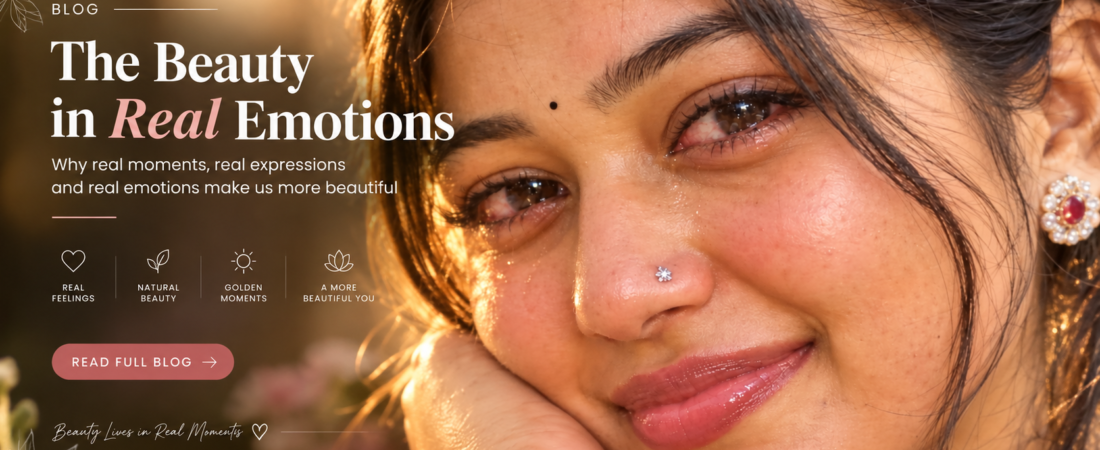
This close-up portrait is built around that idea. You see watery eyes, a gentle smile, natural skin, glossy lips and warm golden-hour light. Nothing is staged to look perfect. It looks like a photo someone took of you in a quiet moment, right after a feeling passed through.
The image explores how genuine emotion and imperfect moments can create a deeper kind of beauty. Instead of hiding vulnerability, it embraces it. A little emotion makes a portrait feel more personal, more human and far more memorable.
Why Real Emotion Feels So Beautiful
Most of us have photos we love for reasons that have nothing to do with how polished they are. A laugh caught mid-sentence, a tired smile at the end of a long day, eyes that are a bit glassy because something touched us. Those pictures stay with us because they feel true.
Polished portraits can be impressive, but they often feel distant. Emotional ones invite you in. When you see someone with slightly red, watery eyes and a soft smile, you don’t just notice how they look. You wonder what they’re feeling. That curiosity is what makes the image stick.
AI-generated portraits often miss this. They tend to be smooth, symmetrical and calm, with a neutral expression that feels a little empty. Adding real emotion is one of the quickest ways to make an AI image feel alive.
What Makes This Portrait Work
Several small details come together here.
- Dark, watery eyes. Slightly red and glistening, as if she has just cried, they carry most of the emotion.
- A soft smile. It adds a feeling of relief or quiet happiness, so the image doesn’t read as sad.
- Glossy pink lips. They catch the light and add a gentle touch of color.
- A silver nose pin and a tiny black bindi. These small details add cultural character and personality.
- Natural skin. Visible texture keeps the portrait honest.
- Warm golden-hour light. It softens everything and gives the face a glow.
- A smartphone feel. Extreme close-up framing makes it feel like a private, spontaneous photo.
The Eyes Tell the Story
In a close-up like this, the eyes are the whole picture. The slight redness and the shine of tears give the face depth, while the dark color of the eyes makes the light inside them stand out.
The key is restraint. You’re aiming for the look of someone who has just cried or is close to it, not someone in distress. A hint of redness and a bit of moisture is enough. If your result looks dramatic or overdone, tone down the wording and regenerate.
Why the Smile Matters
The soft smile is what turns this from a sad image into a moving one. It suggests that the tears came from something complicated: happiness, relief, nostalgia or just being overwhelmed in a good way.
That mix of emotions is what people connect with. It feels honest because real feelings are rarely just one thing.
Golden-Hour Light and Natural Skin
Golden hour, the short window around sunrise or sunset, gives light a warm, soft quality that flatters almost every face. It adds a gentle glow to the skin, brings out warm tones in the lips and eyes, and keeps shadows soft instead of harsh.
Natural skin is just as important. Visible pores, tiny imperfections and small differences in tone make the face look real. Over-smoothed skin is one of the clearest signs of an AI image, and it works against the whole idea of an authentic portrait.
The Complete Prompt
Here’s the prompt to use:
Extreme close-up smartphone portrait, same face and features. Focus on dark eyes, slightly red and watery as if she just cried, glossy pink lips, silver nose pin, tiny black bindi, soft smile, warm golden-hour light, natural skin. 9:16 ratio.
How to Use It, Step by Step
- Choose a clear reference photo. Pick a well-lit, front-facing image where the face is fully visible. Avoid sunglasses, heavy filters and extreme angles.
- Upload it first. Use ChatGPT’s image generation or Google’s Gemini, and upload your photo before pasting the prompt.
- Paste the prompt as written. The phrase “same face and features” tells the tool to keep your identity.
- Generate a few versions. Results change each time, and the second or third attempt is often more natural.
- Adjust one thing at a time. If the eyes look too dramatic, soften only that part, so you can see what made the difference.
Keeping the Same Face
Close-ups are demanding because every detail of the face is visible. To help the tool keep your features:
- Use a sharp, well-lit reference photo.
- Don’t add extra face descriptions like eye shape or age, since they can change the identity.
- If your tool has a reference-strength setting, raise it when the face drifts and lower it if the image looks stiff.
Tips for a More Natural Result
Keep the skin textured. If it looks too smooth, repeat “natural skin texture” or turn off any beautify or enhance options.
Watch the eyes closely. They should look wet and slightly red, but still sharp and believable. If they look glassy like plastic, regenerate.
Check the small accessories. The nose pin and bindi should sit naturally on the face, in the right place and at the right size.
Keep the framing close. The point of this portrait is intimacy, so avoid pulling back to a half-body shot.
Common Mistakes to Avoid
- Too much crying. Heavy tears or a sad expression change the whole mood. Keep it subtle.
- Over-smooth skin. It makes the portrait look artificial.
- A low-quality reference. Dark or blurry photos make it hard to preserve the face.
- Harsh lighting. Without golden-hour softness, the emotion loses its warmth.
- Overloading the prompt. Extra details can pull the image away from the simple, quiet feeling.
Where to Use This Style
This kind of portrait suits profile pictures, Instagram posts and Stories, WhatsApp status updates, mood boards and personal photo collections. The 9:16 vertical format fits mobile screens perfectly and works especially well for Reels covers.
You can also try variations. Change the light to soft window light or a cloudy afternoon, swap the accessories, or adjust the smile to be a little wider or quieter. As long as you keep the close framing and the natural skin, the mood will carry over.
Frequently Asked Questions
Do I need a reference photo?
It’s strongly recommended. Without one, the AI creates a new face. With one, it can stay close to yours.
Will the image look sad?
Not necessarily. The soft smile and warm light balance the watery eyes, so the mood is closer to emotional and gentle than sad.
Can I use this for a man or someone else?
Yes. Change “she” to “he” and adjust the accessories. Keep the close-up framing and the lighting.
Why does my result look too perfect?
Add or repeat “natural skin texture” and “slight imperfections,” and avoid any smoothing options in your tool.
Which tools work best?
ChatGPT’s image generation and Gemini both accept reference photos. Results vary, so it’s worth trying more than one.
Final Thoughts
Perfect portraits are easy to admire, but they’re rarely the ones people remember. The ones that stay with us usually show something real: a feeling that wasn’t planned, a moment that wasn’t polished.
This close-up works because it doesn’t hide vulnerability. The watery eyes, the gentle smile, the natural skin and the warm light all say the same thing: you don’t have to look flawless to look beautiful.
Use a clear reference photo, keep the prompt simple, and let the emotion do the work.