Have you ever wanted to create a realistic night photograph with a cinematic feel, where two people look like they were genuinely photographed together in the same place?
A petrol station at night is a surprisingly good setting for it. The bright canopy lights, the dark sky, the shiny pavement, the fuel pumps and the palm trees around the edges give you a cinematic environment without making the photo look staged.
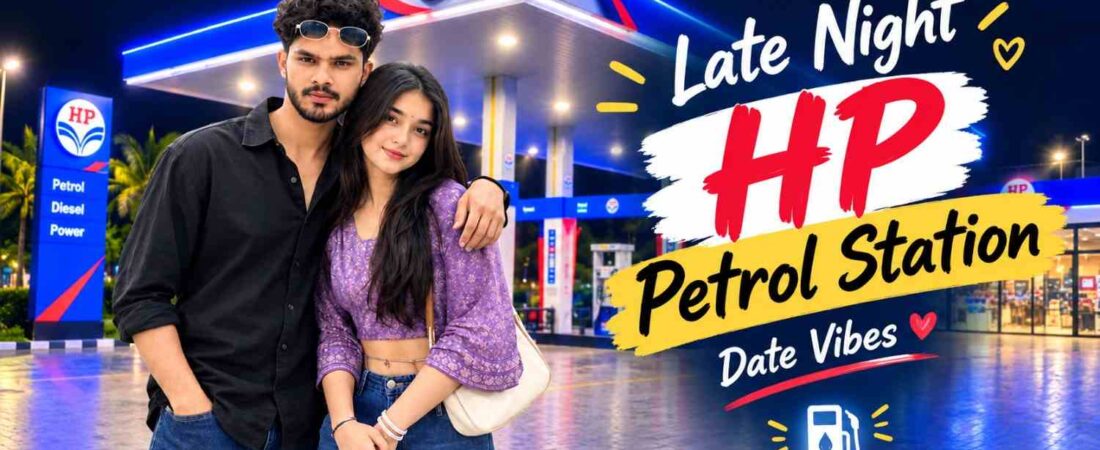
This concept creates a full-body photo of a young South Asian couple standing together at a modern HP petrol station. If you’re looking for a ChatGPT prompt for this kind of image, the most important thing is consistency between the people and the place. The lighting, perspective, proportions, shadows and image quality all have to agree, so the final result feels like one real photograph and not a collage.
The Overall Photography Concept
The image is a vertical 9:16 night photograph. The couple stands in the foreground, with the girl slightly in front and the boy beside or just behind her. Both are visible from head to shoes, so their clothes and proportions are part of the picture.
The goal isn’t an exaggerated romantic pose. Their body language should feel comfortable and spontaneous, like two people taking a casual photo during a night out. The petrol station supplies the setting, and the lighting gives it a cinematic mood.
Creating a Natural Couple Pose
The pose can make or break how believable the image looks. The girl stands slightly in front, while the boy stays close beside or behind her. His hand rests gently around her shoulder or upper back, which feels comfortable without being over the top.
She keeps a natural smile, and he has a relaxed, genuine expression. Posture should look natural and proportions realistic. Their feet should sit properly on the ground, and their height and scale should make sense next to the pumps and canopy.
Clothing and Appearance
The girl wears a white embroidered short-sleeve crop top, high-waisted loose blue baggy jeans and white sneakers. A waist chain, bangles and a small white shoulder handbag add detail.
The boy keeps it simpler, with a black shirt, dark blue jeans and clean white sneakers.
Keeping the clothing consistent matters, because small unnecessary changes can make a composite photo feel artificial. Faces, hairstyle, skin tone and body proportions should also stay true to the reference image you upload.
The HP Petrol Station Background
The background is a big part of the concept. A modern HP station should stay clearly visible behind the couple, with fuel pumps, an illuminated canopy, HP branding, palm trees and a dark night sky. It should look spacious and real, not like a generic generated backdrop.
The pavement can show soft reflections from the station lights. These reflections tie the people to the environment and make the whole photo feel more cohesive. The dark sky also gives the bright white and blue lights a strong contrast to sit against.
Matching Nighttime Lighting
When you combine people with a different background, lighting is everything. If the station has strong blue-white lights, the people should receive light that feels like it comes from those same sources. Their faces shouldn’t look like they were lit somewhere else.
Natural shadows under the feet, subtle highlights on clothing and reflections on nearby surfaces all help. The aim is for both people to look physically present at the station when the shutter clicked.
Prompt 1: The Complete Couple Prompt
Use this prompt exactly as provided:
Create an ultra-realistic cinematic full-body photograph of a young South Asian couple standing together at a modern HP petrol station at night. GIRL: Use the uploaded girl image as the exact identity reference. Preserve her face, facial features, hairstyle, skin tone, body proportions and overall appearance accurately. She is wearing a white embroidered short-sleeve crop top, high-waisted loose blue baggy jeans, white sneakers, delicate waist chain, bangles, and carrying a small white shoulder handbag. Keep her natural smiling expression and feminine appearance. BOY: Add a young South Asian man standing naturally beside her, close to her like a real couple. He has a youthful masculine face, natural hairstyle, realistic skin texture, and a relaxed genuine expression. He is wearing a stylish casual black shirt, dark blue jeans and clean white sneakers. Keep his appearance natural and photorealistic. POSE & COMPOSITION: Both are standing together in the foreground, full body visible from head to shoes. The girl stands slightly in front and the boy slightly beside/behind her. Their body language should look natural, comfortable and candid, like a real couple taking a spontaneous night photograph. The boy can gently place one hand around her shoulder/upper back while the girl stands naturally beside him. Do not make the pose exaggerated. BACKGROUND: Keep the modern HP petrol station clearly visible behind them, with multiple fuel pumps, large illuminated canopy, HP branding, bright white and blue lighting, palm trees and a dark night sky. The petrol station should look realistic and spacious. LIGHTING: Realistic nighttime petrol-station lighting, soft illumination on both faces, natural shadows, subtle reflections on the tiled pavement, realistic blue-white ambient light, cinematic depth and balanced exposure. CAMERA: Professional smartphone/camera photography, vertical 9:16 portrait, full-body framing, eye-level perspective, realistic proportions, shallow natural depth of field, sharp faces, detailed clothing and hair, authentic skin texture. STYLE: Ultra photorealistic, highly detailed, natural colors, realistic anatomy, realistic hands and fingers, cinematic but not overly edited, authentic candid photography, no artificial beauty filter, no cartoon or CGI appearance. IMPORTANT: Keep both people anatomically correct and naturally integrated into the same environment. Match lighting, shadows, perspective, scale and color temperature between the girl and boy. The final image must look like a genuine photograph taken together at the petrol station, not a collage or pasted composite.
Using a Person Reference With a Background
If you’re working from two separate photos, one of the person and one of the location, your prompt needs to say clearly what each image is for. Treat the first as the person reference and the second as the environment. That makes it easier to tell the tool that the person’s identity should stay unchanged while the surroundings are swapped or combined.
This applies to Gemini prompts as well. Clearly separate the reference subject from the background, and say which elements must stay exactly as they are.
Prompt 2: Person and Background Composite
Here’s a shorter prompt, also to be used exactly as provided:
Use the first photo as the exact person reference and the second as the background. Place me naturally into the scene, preserving my face, hairstyle, skin tone, body, clothes, pose, and proportions. Match lighting, shadows, perspective, colors, and camera quality perfectly. Add subtle highlights and realistic shadows for a seamless photorealistic result.
This version works well when you already have a good photo of yourself and a separate background image. It focuses on blending instead of describing a whole new scene.
Prompt 3: Keeping the Original Person Unchanged
When preserving identity is the top priority, a more detailed instruction helps. This one explains that the first image is the person and the second is the HP petrol station:
Use the first image as the exact reference for the person and the second image as the exact HP petrol pump background. Place the person naturally into the HP petrol pump scene without changing anything about her original appearance. Strictly preserve her exact face, facial features, skin texture, hairstyle, hair color, body shape, clothes, shoes, handbag, pose, proportions, and identity exactly as in the original photo—no beautification, no face alteration, no outfit changes, and no AI-looking details. Only composite the person realistically into the petrol pump background with natural perspective, accurate scale, matching lighting, shadows, reflections, and realistic color grading so she looks genuinely photographed at the location. Keep the HP petrol pump background authentic and unchanged, and make the final image a 3:4 portrait aspect ratio in high quality and photorealistic detail.
This is the one to reach for if you don’t want the generator to redesign the original person. The job is simply to place the existing subject into a new environment while keeping every visual detail intact.
How to Use These Prompts, Step by Step
- Pick clear photos. Use a well-lit reference of the person, and a sharp, good-quality photo of the petrol station.
- Choose the right prompt. Use Prompt 1 to build the whole couple scene, Prompt 2 for a quick blend, or Prompt 3 when identity must stay untouched.
- Upload the images in order. Person first, background second, then paste the prompt.
- Generate several versions. Results change each time, and the second or third is often more natural than the first.
- Adjust one thing at a time. Change only lighting, or only the pose, so you can see what helped.
Making the Composite Look Like One Photograph
The biggest challenge in compositing is keeping the foreground and background from feeling disconnected. A few details make the biggest difference:
- Perspective. The person’s position should make sense next to the pumps, pavement and other objects.
- Scale. They shouldn’t look unusually large or small compared with the station.
- Lighting. Highlights and shadows should follow the same direction as the background lights.
- Color temperature. Cool blue-white station light should touch the subject naturally without making skin look odd.
- Ground contact. Feet should look firmly planted, with proper shadows.
- Reflections. Subtle reflections on nearby surfaces help tie the subject in.
Each of these is small, but together they change the whole feel of the image.
A More Authentic Night Photography Feel
You don’t need heavy cinematic effects for this to look impressive. A realistic smartphone or camera look often makes the scene more believable. Sharp faces, natural skin texture, real-looking clothing and a controlled depth of field all help it feel like an authentic photo.
The station already provides plenty of visual interest through its canopy, pumps, signage, reflections and surrounding darkness. Keeping those elements balanced stops the picture from looking over-edited.
Common Mistakes to Avoid
- Mismatched lighting. Faces lit differently from the background are the quickest giveaway.
- Wrong scale. A person who looks too big or small next to the pumps breaks the illusion.
- Floating feet. Without shadows and ground contact, the subject looks pasted on.
- Over-editing. Heavy beauty filters and extra effects make the photo look artificial.
- Changing too much at once. Altering clothes, pose and background together makes it hard to fix problems.
Where to Use This Idea
At Prompt Ayesha, this kind of content is for readers who enjoy experimenting with realistic photography concepts using their own reference images. A good prompt focuses on a simple idea and clearly explains the important elements: subject, location, pose, lighting, camera perspective and realism.
You can apply the same approach to other places, such as cafés, streets, parking areas, rooftops, gardens, hotels or outdoor evening settings. The key is to describe the photo clearly without repeating the same instructions over and over.
Frequently Asked Questions
Do I need two separate photos?
For Prompts 2 and 3, yes. One is the person, the other is the background. Prompt 1 works with just the uploaded girl’s photo.
Which prompt should I start with?
Try Prompt 1 for a full couple scene. If you only want to place yourself into a petrol station photo, Prompt 2 or 3 is the better fit.
Why does the person look pasted in?
Usually it’s a lighting or scale mismatch. Try a person photo with similar lighting, and regenerate.
Can I use a different location?
Yes. Swap the petrol station for a café, street or rooftop, and update the lighting details to match.
Which AI tools work best?
ChatGPT’s image generation and Google’s Gemini can both handle reference photos. Results vary, so it’s worth testing more than one.
Final Thoughts
Creating a convincing couple photo from separate references mostly comes down to consistency. The people, environment, lighting, perspective, scale, shadows and camera feel all need to belong to the same visual world.
The HP petrol station works so well because its night lighting creates natural contrast against the dark surroundings. White and blue lights, wet-looking pavement, palm trees and a glowing canopy give you a cinematic atmosphere while still feeling like an ordinary real place.
Realism doesn’t come from piling on hundreds of effects. Clear instructions about identity, lighting, perspective, anatomy and how the subject fits into the environment usually matter more.
Whether you’re creating a spontaneous couple photo or placing yourself into a completely different location, keep the original subject recognizable and match the environment carefully. That’s what makes the final image feel natural.