Every time the festive season arrives, my social media feed completely changes. Right now, during Navratri, almost everyone is looking for fresh ways to show off their best Garba dresses.
If you spend even five minutes scrolling through your Instagram reels lately, you must have seen that crazy new trend. People are making their festive photos look incredibly deep, emotional, and artistic.
People are calling it the filter unlocked trend. It essentially turns a normal mobile phone selfie into a gorgeous fashion magazine cover.
The best part is that you do not need a heavy camera setup or an expensive lighting kit. You can do the whole thing directly from your phone.
You just need to use the right descriptive words on your favorite image apps. Let us talk about how this style works so you can make your own version tonight.
What is the “New Instagram Filter Unlocked” Aesthetic?
When you look closely at this viral trend, you realize it is not just about changing the colors of your picture like a normal app filter does.
It actually creates an illusion of real physical movement. It makes the entire photo look alive, as if someone snapped your picture while you were spinning fast on a dance floor.
The background gets filled with beautiful streaks of light that stay completely behind you. This trick keeps the main focus straight on your face.
At the same time, the little festive lamps turn into soft glowing circles. This adds a ton of professional depth to the frame.
All your traditional clothes, shiny jewelry, and mirror embroidery stay super sharp and bright. It makes the overall output look highly premium.
If you love playing around with multiple photos at once, you can take these results and put them into an Aesthetic South Asian girl photo collage.
The Master AI Prompt to Copy
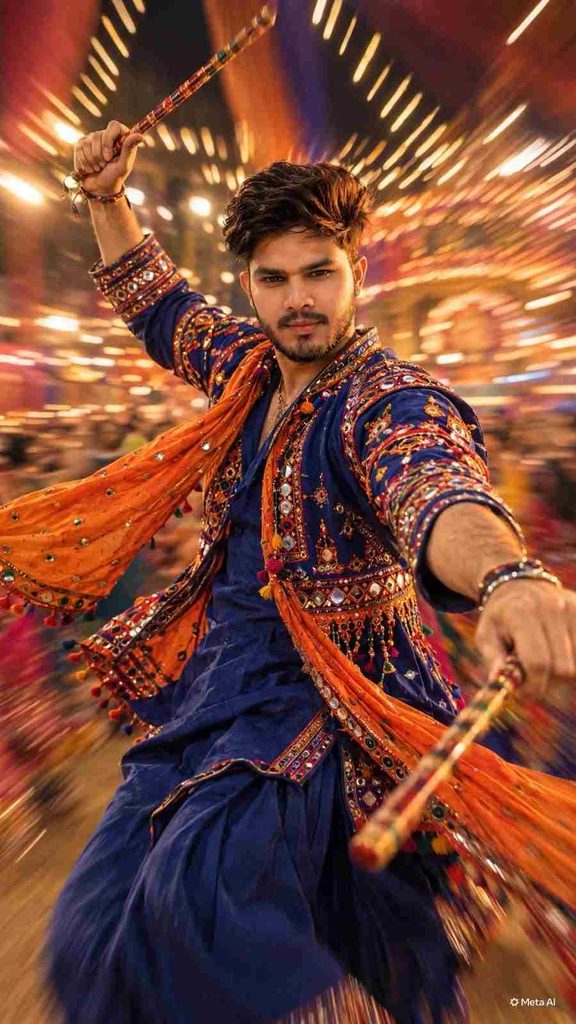
To get a clean image without any weird glitches, you need to feed a very specific description into your generation tool. I spent some time testing different combinations.
This specific sentence gives the cleanest results on both mobile apps and desktop platforms. You can copy this text directly and use it right away:
Step-by-Step Settings for the Best Results
If you want your final image to look like a premium commercial shoot, you just need to keep a few quick things in mind.
Choosing the Correct Size
First, always make sure you pick the correct vertical sizing before you start. It is the most important setting for mobile platforms.
If your goal is to make an Instagram Reel cover, a Story layout, or a mobile wallpaper, always choose the portrait mode option.
Playing with Color Contrast
Second, remember that the secret behind this look is the color contrast. The deep royal blue and the bright festive orange look amazing together.
They sit on opposite sides of the color wheel. This trick naturally forces your eyes to look at the center of the photo instead of getting lost.
If you want to try something a bit different for your next post, you can change those color words to emerald green and hot pink.
Lastly, make sure the blur stays completely away from your eyes and lips so your expressions look completely natural.
Simple Mobile Editing Tips After Downloading
Once your raw photo is ready, do not just post it immediately. Spend a couple of minutes doing some quick touch-ups to make it look polished.
Sometimes these tools make the tiny links on traditional necklaces look a bit fuzzy. You can run your download through any free smartphone enhancer app.
After that, open the photo in a mobile color app. Turn up the brightness of the orange and yellow tones just a tiny bit.
This makes the festive oil lamps feel warm and genuine. If your main goal is to make a viral transition video, start your clip with a casual selfie.
Then, use a popular VN video template to match the music beat perfectly. Reveal your gorgeous new festive portrait exactly when the music drops.
Common Formatting Mistakes You Should Avoid
To keep your website looking completely professional for visitors, try to avoid a few common mistakes that beginners usually make.
Never turn your color settings up so high that your skin starts looking bright orange. That instantly ruins the photographic illusion.
Always take a close look at the hands and fingers before you save the file. If the hands look distorted, simply drop that version and try again.
Also, when you are designing a 3:4 photo collage or a basic banner, remember to leave some empty space on the sides.
Do not crowd the image with massive blocks of text. That makes it very painful for people to read on small mobile screens.
Conclusion
This new visual movement is a fantastic way to mix old cultural styles with modern camera tricks. It gives a unique edge to your profile.
When you learn how to balance sharp fabric textures with moving lights, you create something that naturally stops people from scrolling past.
If you want to discover more fresh ideas, editing tricks, or unique workflows, you can browse through the full creative list on Prompt Ayesha.
Keep experimenting with your own color combinations and poses to create a final style that feels completely personal to you.
If you want to take your editing game to the next level, you can use these exact styles with a specialized ai video prompt to generate smooth video transitions.