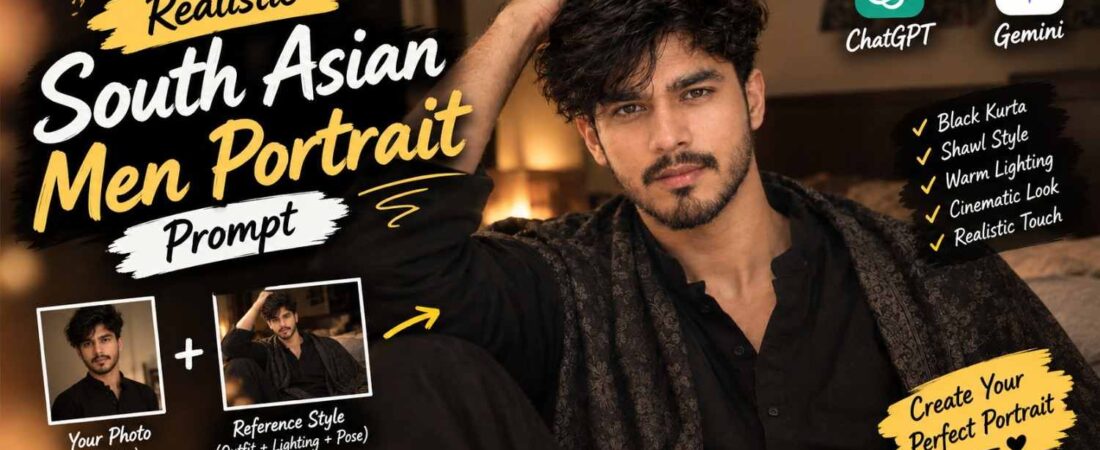
Aesthetic indoor portraits with a traditional outfit and cinematic lighting are becoming increasingly popular for Instagram, Pinterest and profile photos. If you want to create a realistic portrait of a young South Asian man with a black kurta, patterned shawl and relaxed model-like pose, this prompt is designed for that exact style.
This Gemini prompt focuses on realistic facial details, natural skin texture, warm indoor lighting and a soft cinematic atmosphere while keeping the overall photograph natural rather than overly edited. In this comprehensive guide, we will explore the exact prompt, break down why each element contributes to the authentic aesthetic, and share expert tips for achieving the most realistic and visually striking results possible.
Why This Portrait Concept Works
The prompt is designed around several photography elements instead of simply asking for a “handsome man” portrait. This is a crucial distinction. When AI models receive vague instructions, they tend to generate generic, overly polished results that lack character. By specifying details like messy wavy hair, light stubble, and a calm expression, you guide the model toward a more natural and authentic image.
The messy wavy hair gives the subject a natural appearance, while the light stubble and subtle moustache add realistic facial detail. The expression is intentionally kept calm and slightly serious rather than exaggerated. This subtlety is what makes the portrait feel like a genuine photograph rather than a staged fashion shoot.
The black kurta and charcoal patterned shawl also create a sophisticated traditional look without making the portrait appear overly formal. This balance between traditional and casual is what makes the image relatable and shareable.
Traditional Black Kurta & Shawl Styling
The combination of a plain black kurta and dark patterned shawl creates a minimal but elegant aesthetic. The shawl is described as being naturally draped around the shoulders and body rather than perfectly arranged. This small detail can help the final image feel more like a genuine photograph.
When clothing is too perfect—every fold in exactly the right place, every wrinkle smoothed out—the image starts to look artificial. Real fabric has weight, texture, and natural irregularities. By specifying “naturally draped,” you encourage the AI to generate clothing that behaves like real fabric.
The dark color palette also works particularly well with the warm beige and brown background. This contrast between dark clothing and warm surroundings creates depth and visual interest without overwhelming the subject.
Warm Indoor Lighting
Lighting plays a major role in the overall mood of this portrait. The prompt uses warm and soft indoor lighting instead of harsh studio illumination. A muted background combined with gentle shadows creates a cozy atmosphere.
The warm tones can also complement the black clothing while keeping the man’s facial features clearly visible. For an AI prompt like this, specifying the lighting direction, softness and background atmosphere can produce a more controlled result than simply writing “cinematic lighting.”
Why Lighting Direction Matters
In real photography, the direction of light determines where shadows fall and how the subject’s features are sculpted. Soft, diffused light from a large window or a nearby lamp creates gentle transitions between light and shadow, which is flattering for most faces. Harsh, direct light creates strong shadows that can be unflattering. By specifying “warm, soft indoor lighting,” you guide the AI toward the former.
Relaxed Model-Like Pose
The hand resting naturally on top of the hair gives the portrait a casual fashion-photography feel. The body is slightly turned toward the camera while the face looks directly at the lens. This creates a subtle difference between the body angle and facial direction, making the pose feel less stiff.
The slightly low camera angle can also give the subject a confident appearance without making the photograph look overly dramatic. A low angle looks up at the subject, which naturally conveys confidence and presence. But when overdone, a low angle can feel aggressive or unnatural. The prompt’s instruction for a “slightly low camera angle” strikes the right balance.
Hair and Facial Details
Hair is an important part of this particular aesthetic. The prompt asks for medium-length black hair, naturally messy waves, a few strands falling over the forehead, natural volume, light stubble, subtle moustache, defined jawline, soft facial features, and natural skin texture.
These details work together to create a realistic portrait rather than a heavily polished fashion image. When AI models generate faces without specific instructions, they tend to produce overly smooth, plastic-looking skin and perfectly styled hair. By specifying natural details, you counteract this tendency.
The Exact Portrait Prompt
Copy the prompt below and use it with your preferred image-generation or editing tool. Copy it exactly as written for the best results.
Create a realistic aesthetic portrait of a young South Asian man sitting casually indoors. He has medium-length thick, naturally messy wavy black hair falling slightly over his forehead, soft facial features, defined jawline, light natural stubble and a subtle moustache. His expression is calm, slightly serious with a soft confident look.
He is wearing a plain black traditional kurta with a dark black/charcoal patterned shawl draped naturally around his shoulders and body. One hand is resting casually on top of his hair/head, creating a relaxed model-like pose. His body is slightly turned toward the camera while his face is looking directly into the camera.
Warm, soft indoor lighting, muted beige/brown background, cozy bedroom/interior atmosphere, shallow depth of field, cinematic soft focus, natural skin texture, realistic facial details, subtle shadows, slightly moody and romantic aesthetic, dark elegant color palette, candid Instagram/Pinterest-style portrait photography.
Composition: vertical portrait, medium close-up, slightly low camera angle, natural proportions, realistic photography, 4K detail, 85mm lens look, soft background blur, no excessive retouching, no text, no watermark.
Cinematic Background Blur
The background should remain simple and slightly out of focus. A muted beige or brown interior with shallow depth of field helps keep attention on the subject. The prompt avoids recognizable objects and distracting decorations, allowing the portrait to maintain a clean Instagram/Pinterest-style appearance.
The 85mm lens look also supports the idea of a professional portrait photograph with natural subject separation. In real photography, an 85mm lens is often used for portraits because it produces flattering facial proportions and a pleasing background blur.
Tips for Better Results
For a more realistic final image, keep these points in mind:
-
Use natural facial details instead of excessive beauty-retouching instructions.
-
Keep the skin texture visible by specifying “natural skin texture” in your prompt.
-
Avoid making the hair perfectly arranged—messy, natural waves look more realistic.
-
Use soft lighting rather than extremely bright studio light.
-
Keep the background slightly blurred to maintain focus on the subject.
-
Avoid adding unnecessary accessories that might distract from the main subject.
-
Maintain realistic body proportions by avoiding exaggerated features.
-
Don’t overuse words such as “perfect,” “flawless” or “ultra-beautiful.” These can lead to artificial-looking results.
-
Keep the expression subtle and natural rather than exaggerated.
-
Use a vertical 9:16-style composition if the image is intended for Instagram or Pinterest.
Using ChatGPT for Similar Portraits
A ChatGPT prompt can follow the same structure when creating similar portraits. Start with the subject’s appearance, then describe clothing, pose, lighting, environment and camera characteristics.
For example, if you want a different traditional outfit, you can change only the clothing section while keeping the camera angle, lighting and photography style consistent. This makes it easier to create multiple portraits with a similar visual aesthetic.
Instagram & Pinterest Portrait Aesthetic
This type of portrait works especially well for social media because it combines traditional clothing with a modern editorial photography style. The black kurta provides a minimal base, while the patterned shawl adds texture. Warm lighting and soft background blur then give the image a more premium appearance.
The result can work as a profile picture, Instagram post, Pinterest inspiration image or fashion-style portrait.
Frequently Asked Questions
Q: Can I use this prompt with any AI image generator?
Yes, though results will vary by platform. The prompt is written as a detailed visual description, so it can be adapted to most modern AI image tools that support portrait generation.
Q: Why does the AI sometimes make the skin look too smooth?
AI models tend to default to overly smooth, airbrushed skin. To counteract this, emphasize “natural skin texture” and “realistic facial details” in your prompt. Regenerating the image often helps as well.
Q: Can I change the outfit from a black kurta to something else?
Absolutely. The black kurta and shawl are part of the original concept, but you can adapt the prompt to describe any traditional or modern outfit that suits your preferences.
Q: What if the pose looks too stiff?
Specify “relaxed model-like pose” and “natural body position” in your prompt. The hand resting on the hair is a key element that adds casualness to the pose.
Final Thoughts
A realistic traditional portrait doesn’t need complicated styling. A simple black kurta, dark patterned shawl, natural hairstyle and warm indoor environment can create a strong visual aesthetic when the photography instructions are detailed.
The key is to balance natural facial details, realistic skin texture, soft lighting, relaxed posing and shallow depth of field rather than relying on excessive editing.
You can also adapt this concept on Prompt Ayesha by changing the outfit, background, pose or lighting while keeping the same realistic photography approach. With practice and careful attention to detail, you can create portraits that feel both authentic and visually compelling.
Did you find this guide helpful? Share it with someone who might benefit from it. Have questions or want to share your results? Leave a comment below and join the conversation!