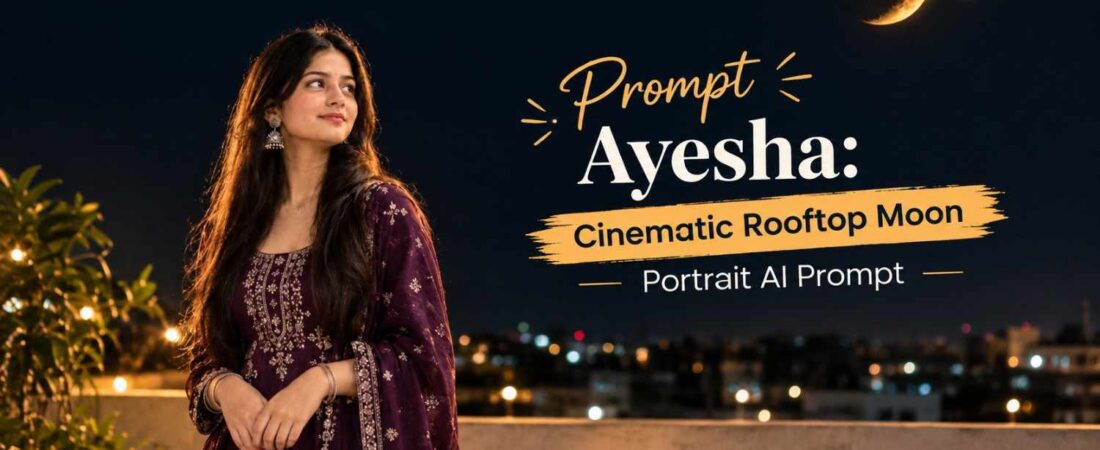
Sometimes, a simple night scene can create a much more beautiful image than an overly complicated setup. A girl standing quietly on a rooftop, looking toward a glowing crescent moon, with soft lights in the distance can create a peaceful and cinematic atmosphere that resonates with viewers on an emotional level.
The key to making this type of image look realistic is maintaining the person’s original identity while carefully controlling the moon, lighting, clothing, and overall composition. This Gemini prompt is designed for that exact purpose, especially when you want to transform an uploaded portrait into a realistic rooftop night scene without changing the person’s face or traditional outfit.
In this comprehensive guide, we will explore why this concept works, provide the exact prompt you need, and share expert tips for getting the most realistic results possible.
Why This Rooftop Portrait Concept Works
The concept combines several visual elements that naturally complement each other: a dark open sky, a glowing orange crescent moon, subtle rooftop surroundings, distant city lights, and soft cinematic lighting. Each element plays a specific role in building the overall mood of the image.
Instead of making the moon excessively large or adding too many stars, the composition keeps the sky relatively clean. This gives the subject and crescent moon enough visual importance without making the image look artificial. When too many elements compete for attention, the viewer’s eye becomes confused, and the emotional impact of the image is diminished.
Another important element is the girl’s pose. Looking upward in a natural side or three-quarter profile makes the scene feel candid rather than like a heavily staged photoshoot. This subtle positioning creates a sense of wonder and contemplation that draws the viewer into the story being told.
For realistic results, identity preservation is especially important. The original facial structure, skin tone, hairstyle, clothing and accessories should remain consistent with the uploaded image. This is what separates a professional-looking AI transformation from a generic, obviously generated image.
The Psychology Behind Cinematic Portraits
There is a reason why certain images capture our attention more than others. Cinematic photography relies on visual storytelling, and our brains are wired to respond to narratives. When we see a person looking at something in the distance, our natural curiosity kicks in. We wonder what they are thinking, what they are feeling, and what they are looking at.
The rooftop setting adds another layer of meaning. Rooftops symbolize perspective, solitude, and reflection. They are spaces where people go to think, to escape, and to find peace. Combining this setting with a moonlit sky creates a powerful visual metaphor for contemplation and inner peace.
The Exact Prompt to Use
Copy the prompt below exactly when creating the image:
Use the uploaded girl photo as the ONLY exact identity reference. 100% STRICT FACE LOCK: unchanged face, features, skin tone/texture, hair and hairstyle; no beautification or face modification.
Create an ultra-realistic cinematic 9:16 night rooftop portrait. Same girl in her exact original dark-purple traditional outfit with all embroidery, jewelry and dupatta details unchanged, standing lower-left/center and peacefully looking upward in natural side/3/4 profile.
Recreate the exact uploaded moon reference: glowing orange crescent, same shape/orientation, realistic craters, warm glow and one bright point beside it, sharp in the upper-right sky. Dark open sky, subtle rooftop/parapet, distant blurred lights.
Natural moonlight + subtle warm rim light, realistic skin/hair/fabric, DSLR 85mm, shallow DOF, cinematic HDR, natural bokeh, photorealistic 4K/8K.
Negative: face/identity change, beautification, altered outfit/hair, duplicate moon/stars, distorted moon, extra people/limbs/fingers, CGI/cartoon, excessive glow, overexposure, blur, text, watermark.
How to Get a More Realistic Result
Getting a realistic result from AI image generation requires more than just copying and pasting a prompt. You need to understand the principles behind each instruction and how they work together to create the final image.
The Importance of Identity Preservation
The uploaded girl image should be used as the primary identity reference. This helps keep the facial characteristics consistent instead of generating an entirely different person. When AI models generate faces without strong reference constraints, they tend to create generic features that may not match the original person at all.
By emphasizing “100% STRICT FACE LOCK” in the prompt, you are instructing the model to prioritize the reference image over its own generative tendencies. This is crucial for anyone who wants to transform a real person’s photo into a creative scene without losing their likeness.
Maintaining the Original Outfit
The prompt also specifically asks for the original dark-purple traditional outfit to remain unchanged. This is useful when the clothing contains embroidery, jewelry or dupatta details that are important to the original photograph.
Traditional outfits often carry cultural significance and personal meaning. Preserving these details ensures that the transformed image still feels authentic to the person in the photo. It also demonstrates the importance of writing specific prompts that address all visual elements, not just the face.
The Role of Lighting in Realistic Images
Lighting is another major part of the scene. Rather than using extremely bright artificial lighting, the prompt asks for natural moonlight combined with a subtle warm rim light. This creates separation between the subject and the dark background while keeping the photograph believable.
The concept of “rim lighting” is borrowed from professional photography. It refers to a light source positioned behind the subject that creates a subtle glow around the edges. This technique is widely used in portrait photography to add depth and dimension to images.
Why Specific Technical Terms Matter
An AI prompt like this works better when the visual instructions are specific but not overloaded with unnecessary effects. Details such as DSLR 85mm, shallow depth of field, natural bokeh and cinematic HDR help communicate the intended photographic style.
These technical terms are not just fancy words. Each one carries specific meaning for the AI model:
-
DSLR 85mm: This refers to a common portrait lens that produces natural facial proportions and flattering compression.
-
Shallow Depth of Field: This creates a blurred background that keeps attention on the subject.
-
Natural Bokeh: This refers to the aesthetic quality of the out-of-focus areas, creating soft circles of light.
-
Cinematic HDR: This indicates high dynamic range, meaning the image should have good detail in both shadows and highlights.
The Importance of the Moon Reference
The crescent moon is one of the most important visual elements in this composition. The prompt asks for the uploaded moon reference to be recreated with the same shape and orientation.
The moon is positioned toward the upper-right portion of the frame while the girl remains toward the lower-left/center. This creates a natural visual balance between the subject and the moon. This technique is known as “rule of thirds” composition, where important elements are placed along imaginary dividing lines rather than in the center of the frame.
The warm orange color also adds contrast against the dark night sky. Realistic craters and a subtle glow help prevent the moon from looking like a flat graphic element. When AI models generate moons without specific guidance, they often create something that looks more like a sticker than a celestial body.
Keeping the sky relatively dark is equally important. Too many stars, excessive glow or an extremely bright background can quickly make the result look more like digital artwork than a real photograph. The goal is to create a scene that feels like it could have been captured with a real camera on a real night.
Creating a Cinematic Photography Look
The 9:16 composition makes this concept suitable for Instagram Reels covers, Stories, Pinterest-style visuals and other vertical content. This aspect ratio is specifically designed for mobile viewing, which is how most people consume content today.
The 85mm DSLR-style look is intended to create natural-looking facial proportions with a pleasing background blur. A shallow depth of field can keep attention on the girl while distant rooftop lights become soft bokeh. This technique is commonly used in portrait photography to create a sense of intimacy and focus.
The phrase “photorealistic 4K/8K” further communicates the desired level of detail, but realistic lighting and texture are more important than resolution terminology alone. High resolution means nothing if the lighting is wrong or the textures look artificial.
If you’re using a ChatGPT prompt for similar portrait concepts, it is useful to clearly separate identity instructions, environment, composition, lighting and negative instructions. This makes the intended transformation easier to understand for both the AI model and for anyone who might want to recreate your results.
What the Negative Instructions Prevent
The negative section is included to reduce common generation problems. Negative prompts are just as important as positive instructions because they tell the AI what to avoid.
It specifically tells the image model to avoid changing the girl’s identity, beautifying the face, altering the outfit or hairstyle, duplicating the moon, creating extra people or limbs, and introducing cartoon or CGI elements.
It also limits excessive glow, overexposure and unwanted blur. These details matter because night scenes can easily become too bright or artificially glowing when an image model interprets “cinematic” too aggressively.
The goal is not to make the image look heavily edited. The goal is to make it feel like a real photograph captured during a peaceful night on a rooftop.
Common Problems and How to Fix Them
Even with a well-written prompt, you may encounter issues. Here are some common problems and how to address them:
| Problem | Solution |
|---|---|
| Face looks different from original | Increase emphasis on “face lock” instructions; use multiple reference images |
| Moon looks fake or distorted | Provide a clear moon reference image; specify “realistic craters” |
| Image is too bright | Emphasize “dark sky” and “natural moonlight” in the prompt |
| Extra limbs or fingers appear | Strengthen negative prompts; use “anatomically correct” language |
| Outfit details are lost | Upload high-resolution reference images; specify each detail |
Frequently Asked Questions
Q: Can I use this prompt with other AI image generators?
A: While this prompt was designed for Gemini, the principles apply to most AI image generators. You may need to adjust the format based on the specific platform you are using.
Q: How many reference images should I upload?
A: For best results, upload at least one clear, high-resolution image of the person’s face and one image of the desired outfit. More references generally lead to better accuracy.
Q: Why does my generated image look different from the example?
A: AI image generation involves some randomness. Even with the same prompt, results can vary. You may need to generate multiple versions and select the best one.
Q: Is it ethical to use AI to transform someone’s photo?
A: Always obtain permission from the person in the photo before using their image for AI transformations. Respecting privacy and consent is essential.
Final Thoughts
A cinematic moonlit portrait doesn’t need complicated scenery to look impressive. A carefully positioned subject, a realistic crescent moon, subtle rooftop details and controlled lighting can create a strong visual story while keeping the image natural.
The biggest difference comes from preserving the original person’s identity and clothing while using the environment and lighting to build a new atmosphere. If you’re experimenting with portrait transformations, this concept is a great starting point for creating realistic night photography with a calm and cinematic mood.
Remember that practice makes perfect. Don’t be discouraged if your first few attempts don’t look exactly as you imagined. Each generation teaches you something new about how the AI interprets your instructions, and you will improve with every try.
For more creative image-generation ideas, detailed prompts and portrait concepts, Prompt Ayesha brings together practical inspiration for people who enjoy experimenting with AI-generated visuals. Whether you are a beginner or an experienced creator, you will find valuable resources to help you bring your creative visions to life.